
Divyaprabandam (ஆழ்வார்களின் அ5.0 - Google Play
You'll be able to see results in few seconds.
Publisher Description

Paasurams by Azhwaargal on 108 divyadesangal is called Divyaprabandam
Collection of Paasurams sung by Azhwaargal on 108 divyadesangal is called Divyaprabandam.
This application is designed to receite the paasurams in:
a) chronological order
b) Filter by Divyadesam
c) Filter by Azhwaargal
d) Filter by Prabandam
e) Adiyen Bhagyam
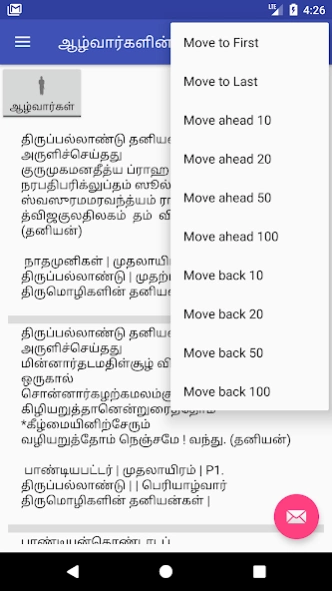
For ease of navigation both forward and backward navigation is supported by 5,10,20,100 on the options menu.
You will be able share the paasuram to email, SMS, etc.
Navigate to Divyadesam and Azhwaargal Avatarastalam using Map application, so you can get more information about the location, place to stay, and driving direction etc.
Here are the highlights of this app:
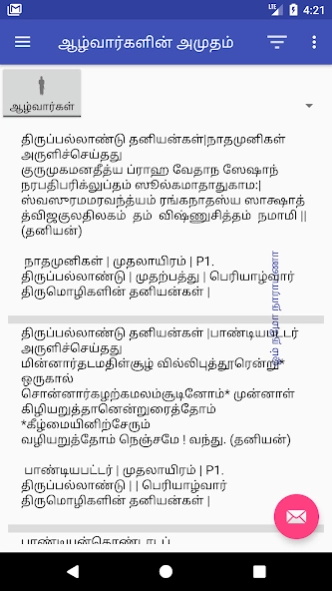
1. Complete set of Divyaprabandam including Taniyangal in one list. Just keep scrolling to read all the paasurams.
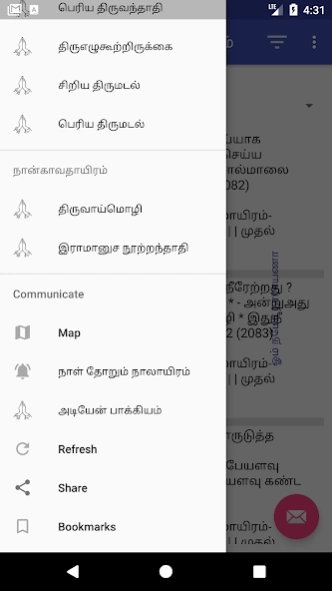
2. You have an ability to read through the paasurams by Prabandam. In order to use this feature, click on the Navigation Draw(see on top left 3 horizontal lines).
3. View Pasurams by Divyadesam, from the main window click on the button named "Azhwaargal" once to toggle to "Divyadesam", select the Divyadesam from the list next to the button. In case the contents are refreshed, goto Navigation drawer and select option "Refresh", and try again.
4. View Pasurams by Azhwaargal, from the main window click on the button named "Divyadesam" once to toggle to "Azhwaargal", select the Azhwaargal from the list next to the button. In case the contents are refreshed, goto Navigation drawer and select option "Refresh", and try again.
5. Filter selected paasurams by clicking on the "Filter" icon on the blue bar. Type the word to filter. Use Tamil keyboard like Google Indic Keyboard(https://goo.gl/eGYEcb) or Google gBoard (https://goo.gl/DBpsug)
6. Map feature displays Divyadesam or Azhwaargal avatharasstalam. In order to use select either Azhwaar or Divyadesam and select "Map" from the Navigation Draw
7. Share the paasuram to your near and dear, to share keep the paasuram on the top and select "Share" from Navigation Draw. This will open options to share, choose the mode you want to perform share.
8. Navigating through vast list of paasuram can be challenging, here is an easy way to Navigate, select Options Menu (top right corner 3 dots) and choose "Filter" type either pasuram number, azhwaar, divyadesam, prabandam, or any word. Alternately, you can choose to jump by 10,20,50,100 both forward and backward. Goto first or last paasuram with ease.
Download from https://goo.gl/LcEZQ2 or explore other offerings from https://goo.gl/k1iSq8
Share this information with your friends and family
About Divyaprabandam (ஆழ்வார்களின் அ
The company that develops Divyaprabandam (ஆழ்வார்களின் அ is Suresh Pillaipakkam Bagukkudumbi. The latest version released by its developer is 5.0.
To install Divyaprabandam (ஆழ்வார்களின் அ on your Android device, just click the green Continue To App button above to start the installation process. The app is listed on our website since 2018-04-22 and was downloaded 0 times. We have already checked if the download link is safe, however for your own protection we recommend that you scan the downloaded app with your antivirus. Your antivirus may detect the Divyaprabandam (ஆழ்வார்களின் அ as malware as malware if the download link to vaishnavism.eclass.ta.divyaprabandamfull is broken.
How to install Divyaprabandam (ஆழ்வார்களின் அ on your Android device:
- Click on the Continue To App button on our website. This will redirect you to Google Play.
- Once the Divyaprabandam (ஆழ்வார்களின் அ is shown in the Google Play listing of your Android device, you can start its download and installation. Tap on the Install button located below the search bar and to the right of the app icon.
- A pop-up window with the permissions required by Divyaprabandam (ஆழ்வார்களின் அ will be shown. Click on Accept to continue the process.
- Divyaprabandam (ஆழ்வார்களின் அ will be downloaded onto your device, displaying a progress. Once the download completes, the installation will start and you'll get a notification after the installation is finished.
Program Details
System requirements
Download information
Pricing
Version History
version 5.0
posted on 2018-04-22
In this release, "நாள௠த௠ற௠ம௠திவ௠யபிரபந௠தம௠" is enabled and working
version 5.0
posted on 2018-04-22
In this release, "நாள் தோறும் திவ்யபிரபந்தம்" is enabled and working
Disclaimer
Official Google Play Link
We do not host Divyaprabandam (ஆழ்வார்களின் அ on our servers. We did not scan it for viruses, adware, spyware or other type of malware. This app is hosted by Google and passed their terms and conditions to be listed there. We recommend caution when installing it.
The Google Play link for Divyaprabandam (ஆழ்வார்களின் அ is provided to you by apps112.com without any warranties, representations or guarantees of any kind, so access it at your own risk.
If you have questions regarding this particular app contact the publisher directly. For questions about the functionalities of apps112.com contact us.
